# Dropbox Integration Setup

### Getting Started <a href="#h_01h9kvbyfg5yn5bf0qd2htbsww" id="h_01h9kvbyfg5yn5bf0qd2htbsww"></a>

BalkanID recommends creating a separate service account for the purposes of this integration, instead of using personal or employee named accounts.&#x20;

#### Requirements: <a href="#h_01hq2mpd449y200sdjd084c3e4" id="h_01hq2mpd449y200sdjd084c3e4"></a>

* ***Client ID***
* ***Client Secret***
* ***Initial Access Code***

#### Steps to obtain credentials <a href="#h_01h9kvbyfge7yeht7gqe85p4j5" id="h_01h9kvbyfge7yeht7gqe85p4j5"></a>

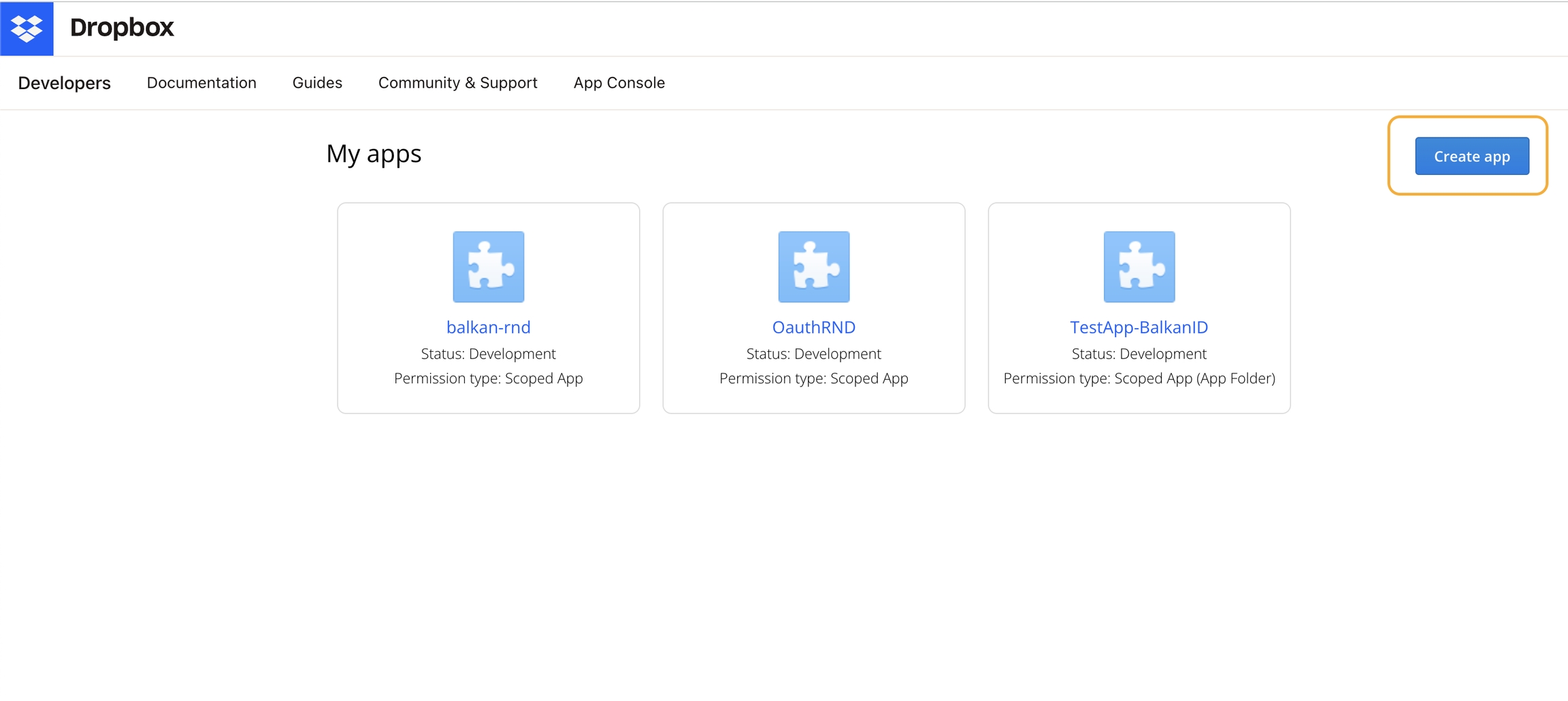
1. Once you have a dropbox enterprise account, you’ll need to create a scoped application. Visit <https://www.dropbox.com/developers/apps> and create a new app.<br>

   <figure><img src="https://content.gitbook.com/content/bVGYwk8aSk5yI1GDPEW9/blobs/520Lgk7M1v7vXD2SxFKR/image.png" alt=""><figcaption></figcaption></figure>
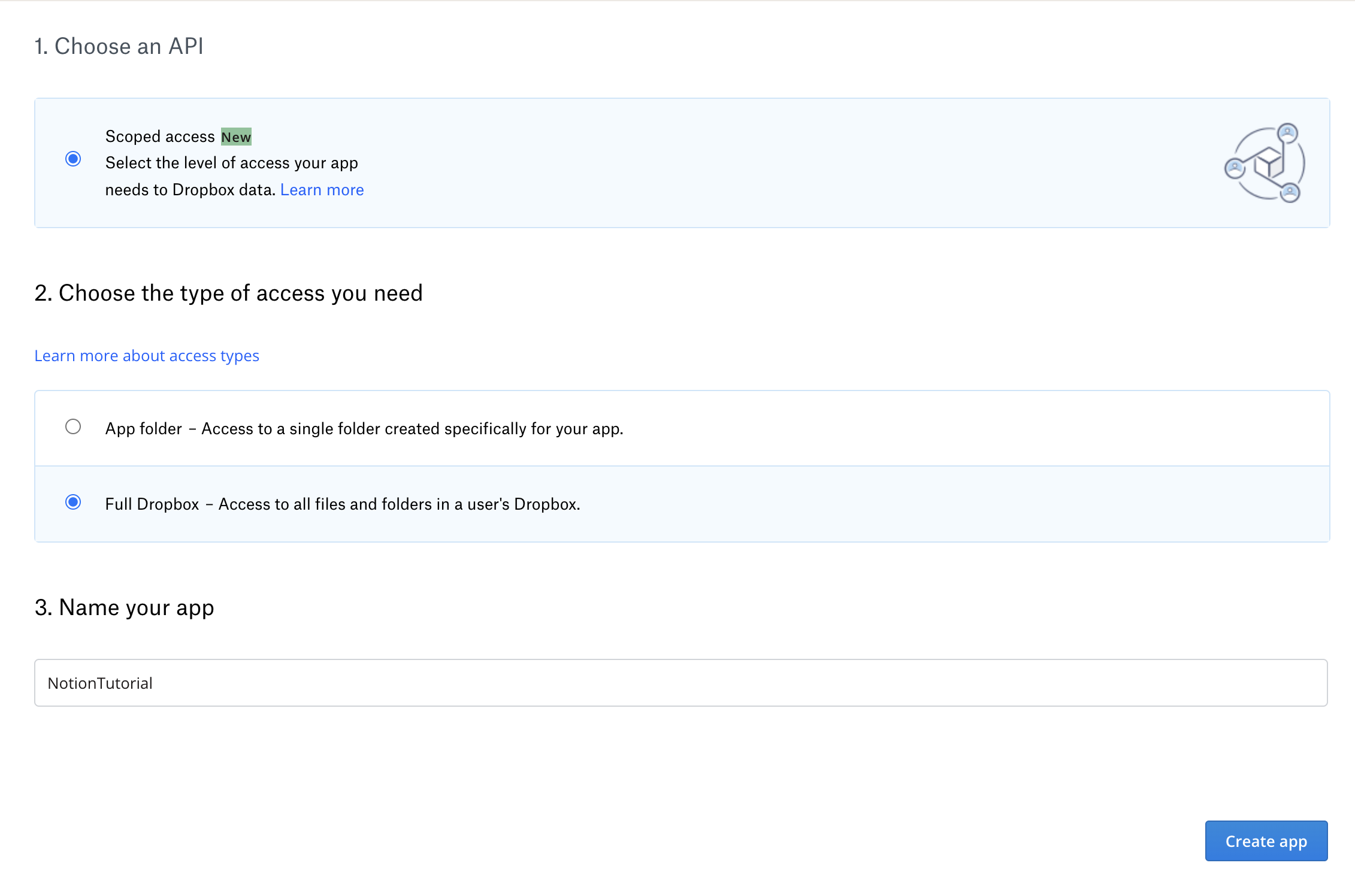
2. Choose options according to the images below:<br>

   <figure><img src="https://content.gitbook.com/content/bVGYwk8aSk5yI1GDPEW9/blobs/CS5gRd8OD2gohe8hnOoQ/image.png" alt=""><figcaption></figcaption></figure>
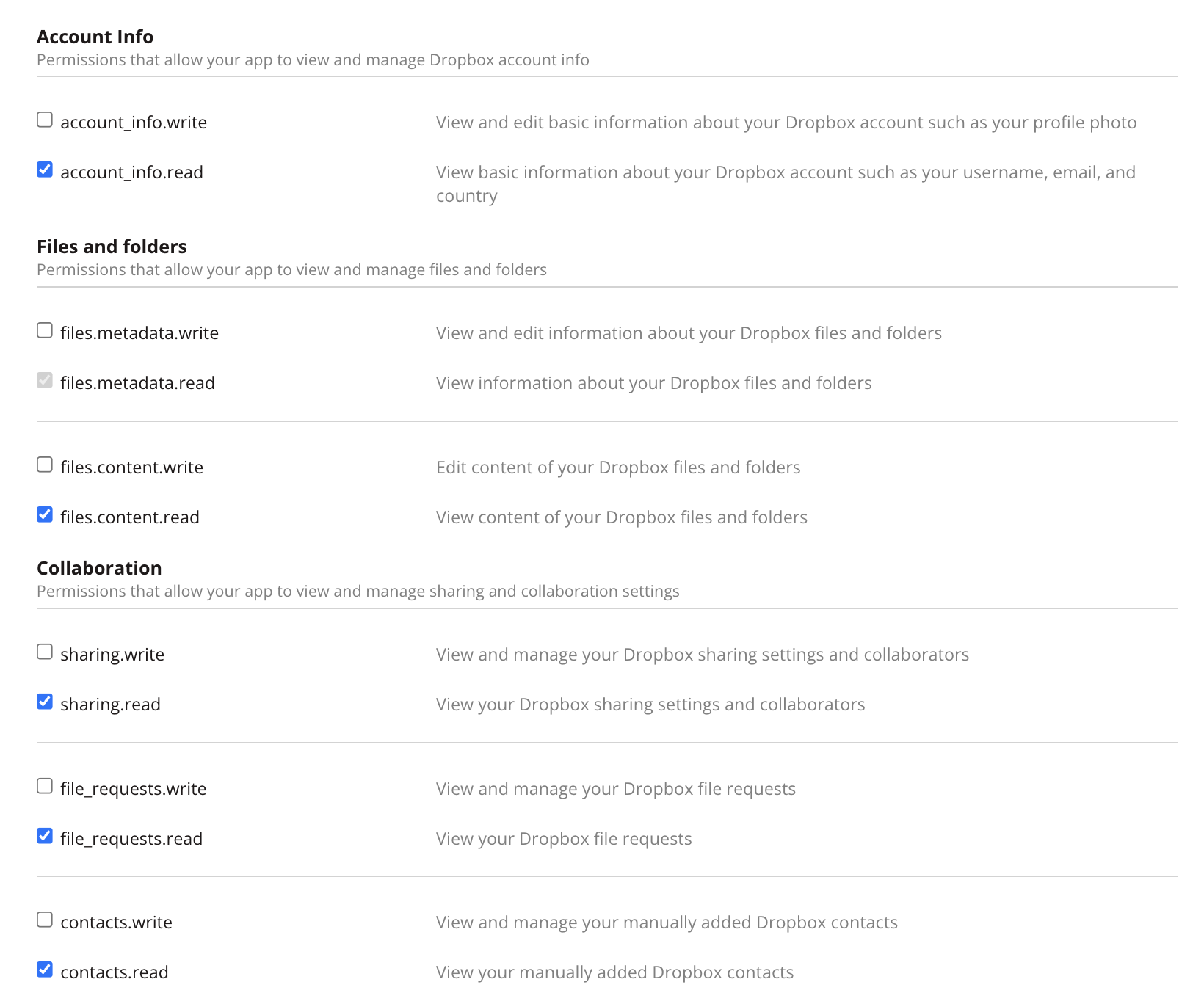
3. Select the following individual scopes:<br>

   <figure><img src="https://content.gitbook.com/content/bVGYwk8aSk5yI1GDPEW9/blobs/OmTP7ENooak9Vo6wfhxM/image.png" alt=""><figcaption></figcaption></figure>
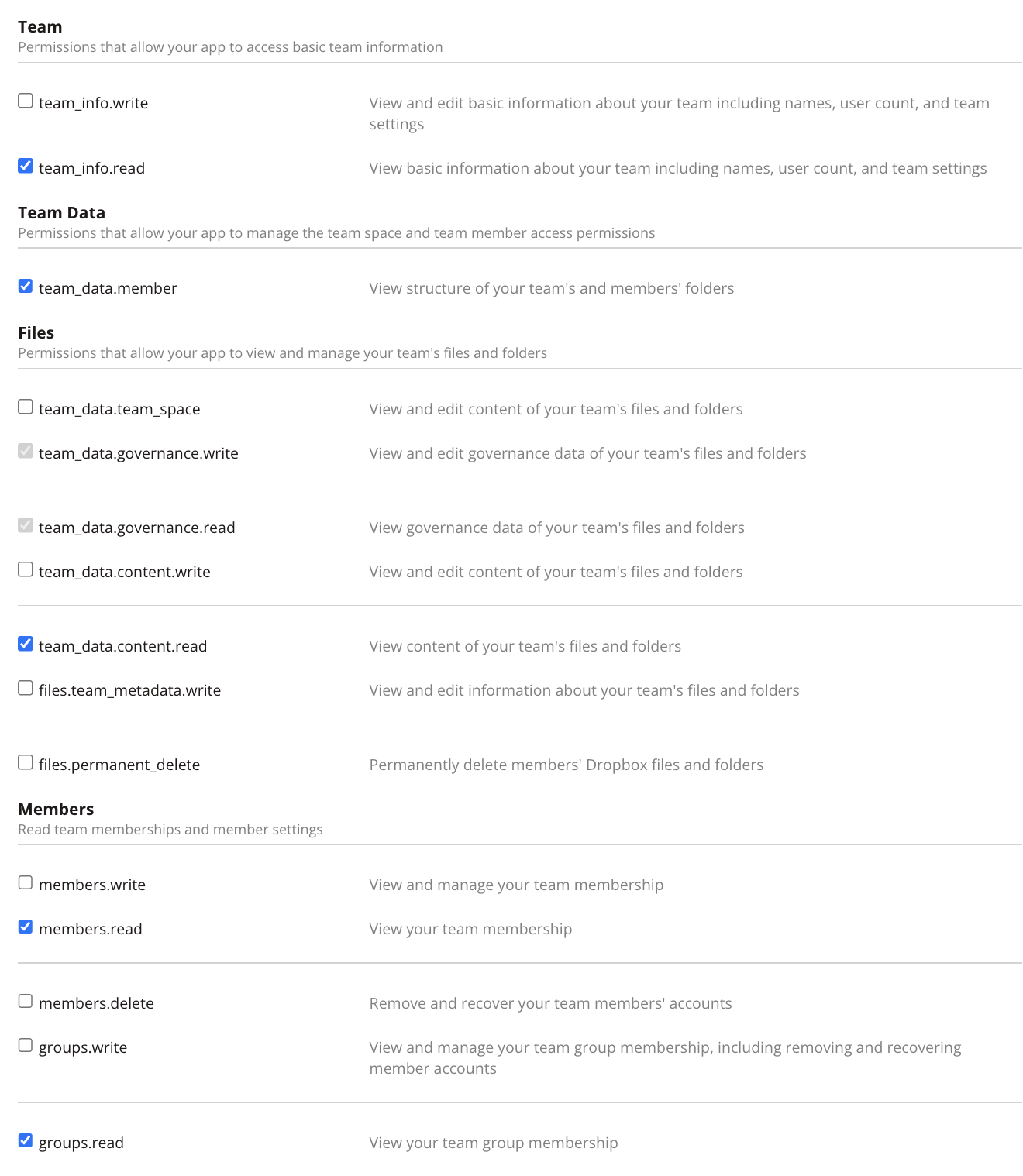
4. Select the following team scopes.<br>

   <figure><img src="https://content.gitbook.com/content/bVGYwk8aSk5yI1GDPEW9/blobs/R2AGhVkbz6vyGEzyYbUH/image.png" alt=""><figcaption></figcaption></figure>
5. We have configured our dropbox app.
6. We will need to populate the `client_id`, `client_secret` and `initial_auth` fields, for `client_id` and `client_secret` we’ll need to visit the dropbox app console at [https://www.dropbox.com/developers/apps.](https://www.dropbox.com/developers/apps)<br>
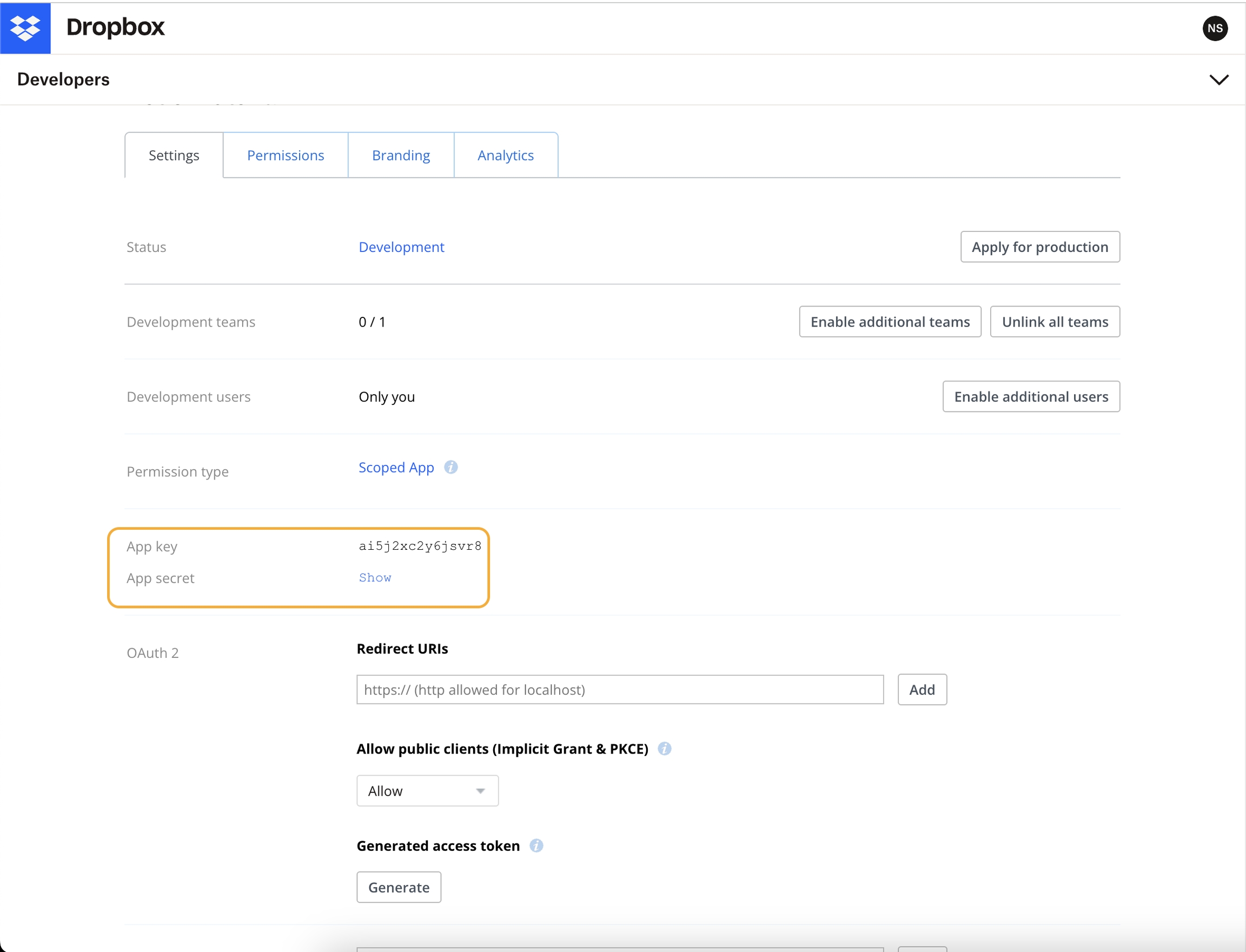
   <figure><img src="https://content.gitbook.com/content/bVGYwk8aSk5yI1GDPEW9/blobs/AkpkzZTHStR8EzgKy2jD/image.png" alt=""><figcaption></figcaption></figure>
7. Now for the `initial_auth` value, we’ll need to visit an auth URL. [https://www.dropbox.com/oauth2/authorize?client\_id=\`client\_id\`\&token\_access\_type=offline\&response\_type=code.](https://www.dropbox.com/oauth2/authorize?client_id=%60client_id%60\&token_access_type=offline\&response_type=code)<br>

   <figure><img src="https://content.gitbook.com/content/bVGYwk8aSk5yI1GDPEW9/blobs/mGwSTzMyShfRkWymxIYd/image.png" alt=""><figcaption></figcaption></figure>
8. In the above url copy the url and add your client id value and visit the url, you’ll be asked for consent and be shown the permission scopes. at the end you’ll receive an auth token which you’ll add to the `initial_auth` value.

*Note: You’re supposed to leave `refresh_token`field empty while configuring the BalkanID tenant as the script will populate it on its own*.

### Configure Dropbox within your BalkanID tenant <a href="#h_01h9kvbyfgy823e7c33q9h3haz" id="h_01h9kvbyfgy823e7c33q9h3haz"></a>

1. Login to the BalkanID application and switch to the tenant you would like to add your integration to.
2. Head to *Integrations* > *Third Party Applications* and click **Add Integration**, select **Dropbox**. Set up the *Primary Application owner* and the *Description*, if any.<br>

   <figure><img src="https://content.gitbook.com/content/bVGYwk8aSk5yI1GDPEW9/blobs/1CKVfTUbZFKoz1xpHZ7L/image.png" alt=""><figcaption></figcaption></figure>
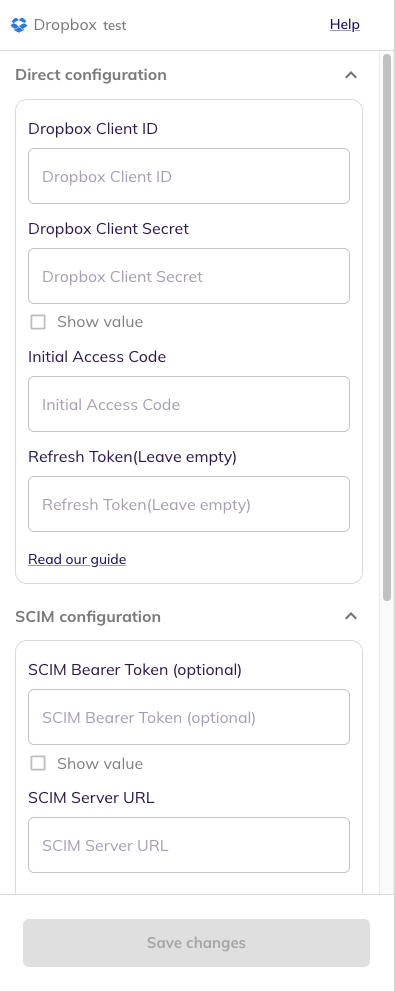
3. *Dropbox* would have been added to the list of applications. Click on the **Configure and Integrate** button beside the integration name, and configure the fields with the values that were noted prior. It should look like this:<br>

   <figure><img src="https://content.gitbook.com/content/bVGYwk8aSk5yI1GDPEW9/blobs/lx91bqvgdNs7pXov0n2I/image.png" alt=""><figcaption></figcaption></figure>
4. Once you filled in the information, click **Save changes**. Your integration is now configured and you will see the status of the integration displayed alongside other integrations on the *Integrations* page. Integrations are synced daily. When data is available, the integration Status column will read **Connected** and the integration Message will read **Data available**.


---

# Agent Instructions: Querying This Documentation

If you need additional information that is not directly available in this page, you can query the documentation dynamically by asking a question.

Perform an HTTP GET request on the current page URL with the `ask` query parameter:

```
GET https://docs.balkan.id/getting-started/setting-up-your-tenant/application-integrations/direct-application-integration/dropbox-integration-setup.md?ask=<question>
```

The question should be specific, self-contained, and written in natural language.
The response will contain a direct answer to the question and relevant excerpts and sources from the documentation.

Use this mechanism when the answer is not explicitly present in the current page, you need clarification or additional context, or you want to retrieve related documentation sections.