> For the complete documentation index, see [llms.txt](https://docs.balkan.id/llms.txt). Markdown versions of documentation pages are available by appending `.md` to page URLs; this page is available as [Markdown](https://docs.balkan.id/user-access-reviews/access-review-management/tracking-campaigns-and-performing-access-reviews/collaborating-with-comments-on-reviews.md).
# Collaborating with comments on reviews
## Comments
Use comments to discuss access reviews in context. Ask questions, add decision context, and document outcomes without leaving the review.
This page covers what comments can do everywhere they appear, then walks through three independent ways to work with them:
* **Risk Manager / Admin flow** — commenting from the Access Reviews page.
* **Reviewer flow** — commenting from the review cards inside your assigned campaigns, under My Tasks.
* **Collaborator flow** — for people who are part of a comment thread without being an assigned reviewer, risk manager, or admin on that review, reached through a My Tasks comment task or a notification.
### Comment capabilities
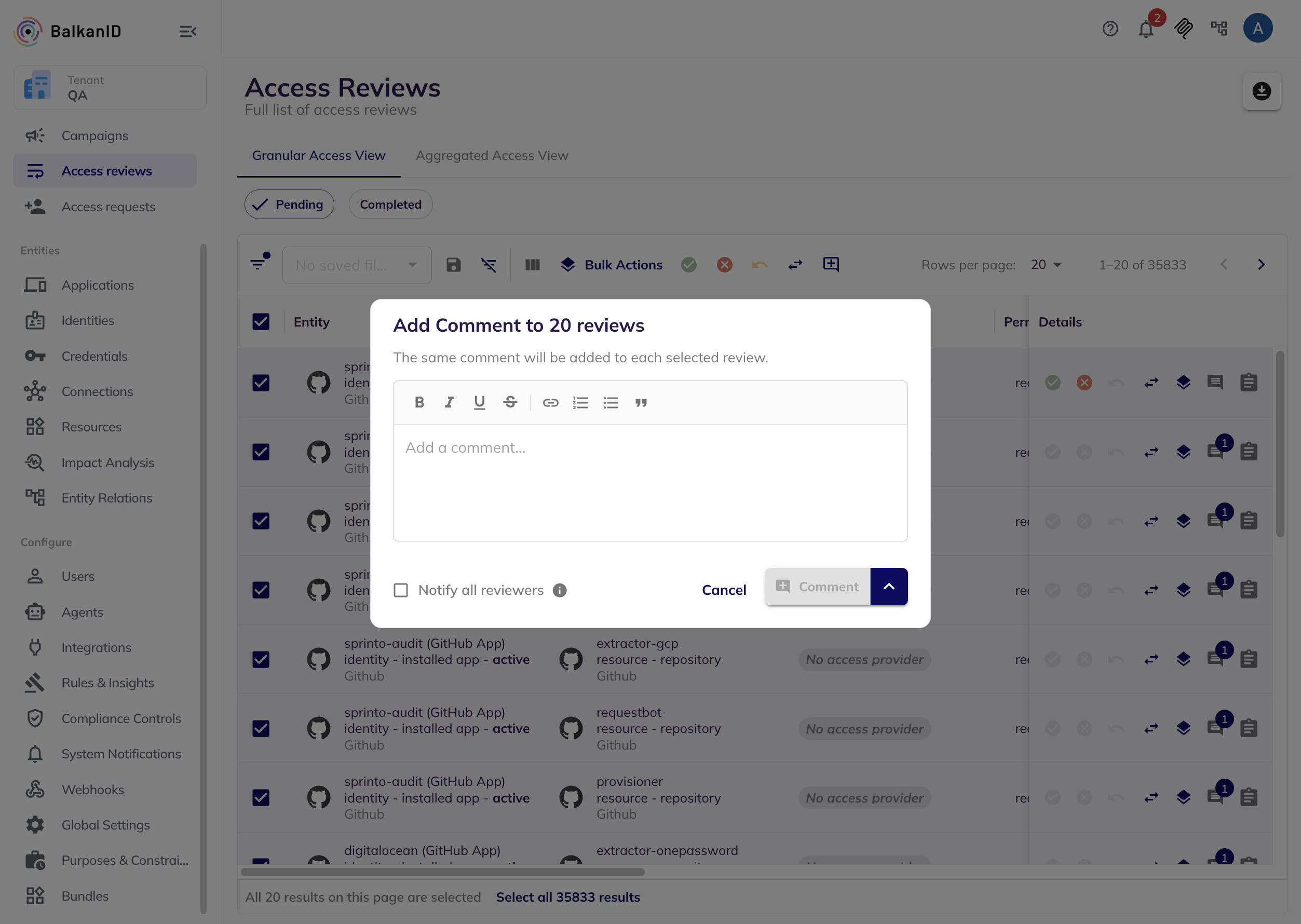
You can comment on individual, aggregated, and bulk-selected reviews. The comment field supports rich text and @mentions. Use the menu beside the submit button to choose how to post:
* **Comment** — posts your message.
* **Request Information** — posts an unresolved comment. The review cannot be approved or denied until the comment is resolved. This option is available only for new threads.
* **Reply and Resolve** — replies to an unresolved comment and resolves it in the same action. This option is available only for replies.
Select **Notify all reviewers** to notify everyone assigned to the review.
{% hint style="warning" %}
You cannot edit or delete posted comments. Use Resolve or Unresolve to update a thread's status.
{% endhint %}
#### Asking for information
{% hint style="info" %}
To start a new comment thread on a review with no prior comments, you must be a Risk Manager, Admin, or the Assigned Reviewer.
{% endhint %}
To pause a review until someone provides context, open the comment field on that review, type your question, and select **Request Information** from the menu beside the submit button instead of **Comment**.
This posts the message as a new thread with an orange **Needs info** label. The review cannot be approved or denied until someone resolves it — see Resolving comments below.
Request Information only starts new threads. To follow up inside an existing thread, reply with **Comment** to keep it open, or **Reply and Resolve** to close it out.
Risk-manager, admin, assigned reviewer flow
Collaborator flow
#### Resolving comments
Comment lists show newest first. Unresolved comments display an orange **Needs info** label and a **Resolve** button. After resolution, the label shows who resolved the comment and when — select **Unresolve** to reopen the thread.
You can reply to a top-level comment; threads support one reply level.
Reviews can be reassigned while comments remain unresolved, but they cannot be approved or denied until all unresolved comments on them are resolved.
#### Comments on aggregated reviews
An aggregated review combines an identity's campaign access into one record. Its comments remain separate from comments on its underlying individual reviews.
* When an aggregated review has an unresolved comment, its underlying reviews link to that discussion.
* On the campaign summary page, the Aggregated Comments panel displays comments from filtered reviews in one feed.
#### Notifications
Comments notify people in these ways:
* **Notify all reviewers** — notifies everyone assigned to the review.
* **Mentions** — typing @username notifies that person.
* **Thread involvement** — notifies the author, respondents, and mentioned users about new thread activity.
Selecting a comment notification opens the Review Conversation page directly on that thread — see the collaborator flow below.
**Managing notification preferences**
Configure comment notifications at either level:
* **Tenant-wide** — administrators can go to Configure → System notifications and update Comments settings.
* **Per user** — select your avatar, then go to Preferences and update Comments settings.
At both levels, configure these notification types independently: new comments from Notify all reviewers, thread activity, and mentions.
#### Audit log
The access review audit log records comment actions that affect the review workflow, including resolving and reopening comments.
### Risk Manager / Admin flow
Risk managers and admins work with comments from the **Access Reviews** page.
#### Open the comments panel
Select the comment icon in the Details column of the Access Reviews table. The panel opens on the right and displays the review conversation, along with a field for posting a new comment. A badge in the Details column shows the number of unresolved comments.
#### Filter reviews by comments
Use comment filters to focus on reviews that need attention. Add any of these filters from the filter panel:
* **Has Comments** — reviews with at least one comment.
* **Unresolved Comments** — reviews with an open thread that needs a response.
* **My Conversations** — reviews where you started, replied to, or were mentioned in a thread.
* **My Unresolved Conversations** — your conversations with an unresolved thread.
#### Comment on multiple reviews
Select the relevant rows in the Access Reviews table, then select **Add Comment** from the bulk actions bar. You can use Comment and Request Information in bulk — Request Information creates an unresolved comment on every selected review.
### Reviewer flow
Reviewers work with comments from the same review-list view risk managers and admins use, just scoped to reviews assigned to them and reached from My Tasks page.
From My Tasks, open one of your assigned campaigns. You'll land on the same review list — comment icon, unresolved-comment badge, filters, and bulk actions all included — described in the Risk Manager / Admin flow above. Reviewing and commenting works identically; only the set of reviews you see differ from the admin view.
### Collaborator flow
Some people end up part of a comment thread without being an assigned reviewer, risk manager, or admin on that review — for example, someone @mentioned in a comment, or someone who replied to a thread they were looped into. You count as involved in a thread if either of the following is true:
* You authored or were @mentioned in the top-level comment that started the thread.
* You authored or were @mentioned in a reply to that thread.
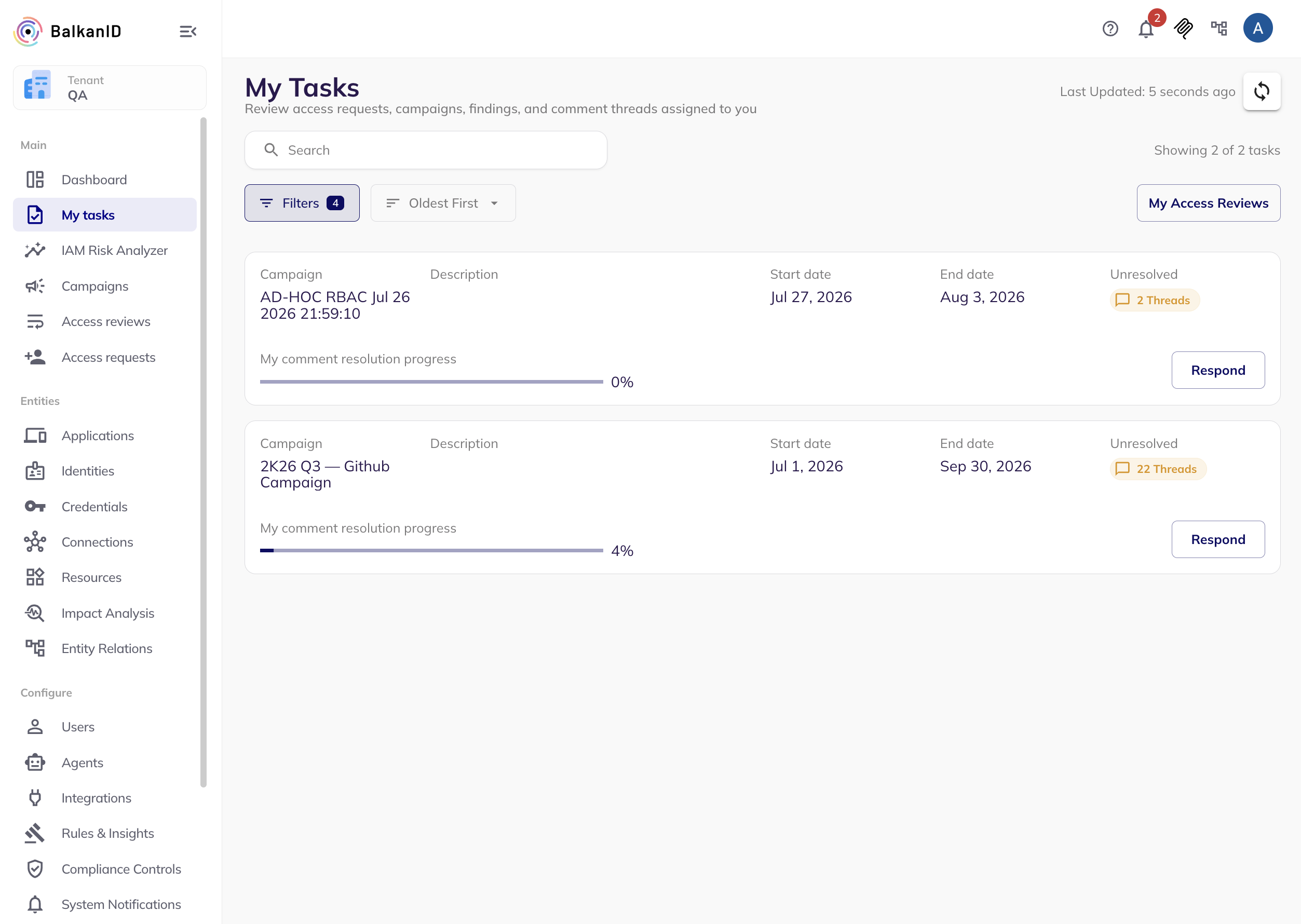
If any of your comment threads on a campaign are unresolved, that campaign shows up on your My Tasks as a card with:
* An **Unresolved** chip with the number of open threads (for example, "3 threads").
* A progress bar tracking your comment resolution progress across that campaign.
* A **Respond** button.
Selecting **Respond** opens the **Review Conversation** page for that campaign, listing your unresolved threads alongside the relevant review details for each one so you can reply without navigating away.
Unresolved comments shown in My Tasks page grouped by campaigns
Review Conversation page redirect from a notification (email)
You can also reach the Review Conversation page directly from a comment notification — a single notification can cover threads across several campaigns and deep-links to all of them at once.
{% hint style="info" %}
Use the 'Show All' button to show reviews where you were involved which have now been resolved.
{% endhint %}
### Common uses for comments
* **Explain a decision** — document why access was approved, denied, or left unchanged.
* **Request information** — pause a review until someone provides the required context.
* **Involve stakeholders** — mention security, compliance, risk, or assigned reviewers.
* **Manage reviews at scale** — request information across multiple reviews at once.
* **Document exceptions** — record temporary access, exceptions, and follow-up actions.
* **Maintain an audit trail** — resolution and reopening actions appear in the review history.
---
# Agent Instructions
This documentation is published with GitBook. GitBook is the documentation platform designed so that both humans and AI agents can read, navigate, and reason over technical content effectively. Learn more at gitbook.com.
## Querying This Documentation
If you need additional information that is not directly available in this page, you can query the documentation dynamically by asking a question.
Perform an HTTP GET request on the current page URL with the `ask` query parameter, and the optional `goal` query parameter:
```
GET https://docs.balkan.id/user-access-reviews/access-review-management/tracking-campaigns-and-performing-access-reviews/collaborating-with-comments-on-reviews.md?ask=&goal=
```
`ask` is the immediate question: it should be specific, self-contained, and written in natural language.
`goal` is optional and describes the broader end goal you are ultimately trying to accomplish on behalf of the user. GitBook uses it to tailor the answer towards what is most useful for that goal.
The response will contain a direct answer to the question and relevant excerpts and sources from the documentation.
Use this mechanism when the answer is not explicitly present in the current page, you need clarification or additional context, or you want to retrieve related documentation sections.