> For the complete documentation index, see [llms.txt](https://docs.balkan.id/llms.txt). Markdown versions of documentation pages are available by appending `.md` to page URLs; this page is available as [Markdown](https://docs.balkan.id/lifecycle-management/bundles.md).
# Bundles
A **Bundle** is a named, reusable collection of accesses that spans one or more connections across multiple applications. Bundles are created and managed by **BalkanID administrators** to simplify access provisioning for common roles or use cases.
For example, an administrator can create an **Engineering Baseline** Bundle that includes the required access for Okta, Jira, and GitHub. Users can then request the entire Bundle in a single, atomic access request instead of submitting separate requests for each application.
Bundle requests follow the same request, review, and provisioning workflow as standard access requests. Once approved, the requested access is provisioned across all applications included in the Bundle.
#### Bundle Lifecycle
1. **Creation:** An administrator creates a Bundle by giving it a name and selecting the connections it should grant across one or more applications. Bundles that are marked for the catalog become available to users in the service catalog.
2. **Assignment:** An identity owner requests a Bundle from the service catalog, choosing whether to **Assign** (grant) or **Unassign** (revoke) its accesses, and whether access is **Permanent** or **Temporary**. The request is reviewed and approved just like any other access request.
3. **Provisioning:** Once approved, access is provisioned across every application in the Bundle. Each application is fulfilled independently and the request tracks a rolled-up status, so a partial failure in one application is surfaced without blocking the others.
4. **Usage:** The identity owner retains the Bundle's accesses across all included applications for the duration of the request.
5. **De-provisioning:** For a Temporary Bundle request, access is automatically revoked across every application when the expiration date is reached. An **Unassign** request revokes the Bundle's accesses immediately upon approval.
6. **Revocation and Updates:** Administrators can edit a Bundle's connections or delete it at any time to reflect changing access requirements.
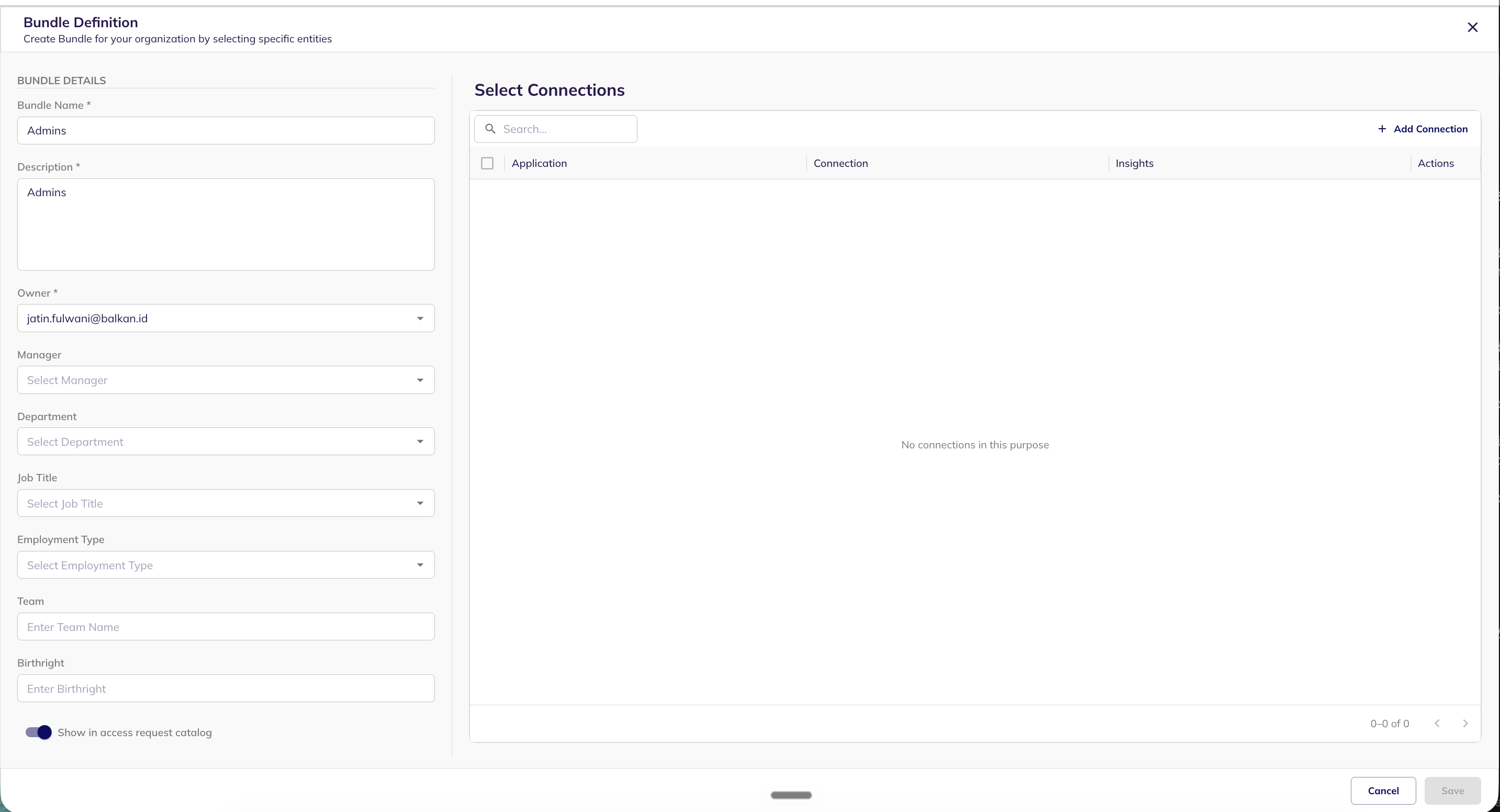
#### Creating a bundle
Bundles are created and managed by administrators from the **Bundles** section.
1. Navigate to **Configure → Bundles** and click **Create bundle**.
2. Fill in the Bundle **name** and **description**, and set the **owner** who is responsible for the Bundle.
3. Under **Select connections**, add the connections this Bundle should grant. Connections can span multiple applications — this is what makes a Bundle cross-application.
4. Enable **Show in catalog** so the Bundle appears to users in the service catalog, then save. The new Bundle is listed with a stacked icon of the applications it spans.
---
# Agent Instructions
This documentation is published with GitBook. GitBook is the documentation platform designed so that both humans and AI agents can read, navigate, and reason over technical content effectively. Learn more at gitbook.com.
## Querying This Documentation
If you need additional information that is not directly available in this page, you can query the documentation dynamically by asking a question.
Perform an HTTP GET request on the current page URL with the `ask` query parameter, and the optional `goal` query parameter:
```
GET https://docs.balkan.id/lifecycle-management/bundles.md?ask=&goal=
```
`ask` is the immediate question: it should be specific, self-contained, and written in natural language.
`goal` is optional and describes the broader end goal you are ultimately trying to accomplish on behalf of the user. GitBook uses it to tailor the answer towards what is most useful for that goal.
The response will contain a direct answer to the question and relevant excerpts and sources from the documentation.
Use this mechanism when the answer is not explicitly present in the current page, you need clarification or additional context, or you want to retrieve related documentation sections.