> For the complete documentation index, see [llms.txt](https://docs.balkan.id/llms.txt). Markdown versions of documentation pages are available by appending `.md` to page URLs; this page is available as [Markdown](https://docs.balkan.id/getting-started/setting-up-your-tenant/application-integrations/direct-application-integrations/escape-integration-setup.md).
# Escape Integration Setup
### Getting Started
Use this guide to connect Escape to your BalkanID tenant. BalkanID reads your Escape organization's members, roles, projects, and assets, plus the third-party integrations and DAST scan profiles that hold credentials on your behalf. You can then review who can reach which project, asset, or stored credential, and how.
You will need an API key from an Escape user with an organization-wide Admin role, and access to the Integrations section in BalkanID.
#### Requirements:
Before you begin, collect the following value from Escape:
* **API Key**
### Configure Escape within your BalkanID tenant
1. Sign in to Escape as a user who holds the **Admin** role bound at the organization level, not to a single project. A project-scoped Admin cannot read your organization's members or roles, and the sync will stop with a message saying so.
2. Open your user profile page (`https://app.escape.tech/user/profile/`) and copy your **API Key**. The key acts with that user's own role bindings, so consider using a dedicated account that will not lose its Admin role when people change teams.
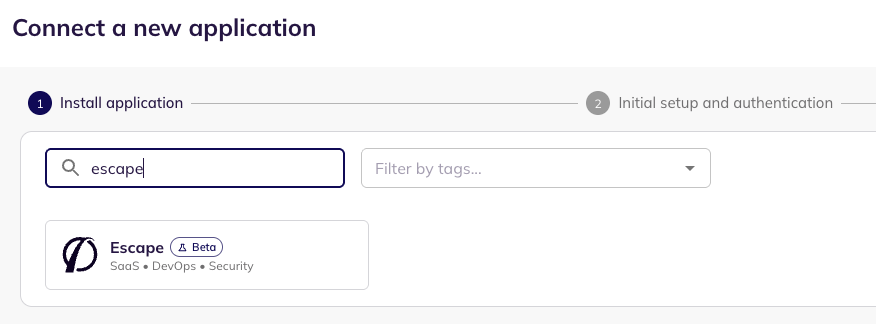
3. In BalkanID, go to **Configure** > **Integrations** and select **Add integration**, then search for **Escape**, select the application, and click **Next**.
Connect a new application
4. Review **Data Sync Preferences**. Then, under **Select Extraction Type**, keep **Direct Configuration** selected, paste your **API Key** into the corresponding field, and click **Next**.
Data Sync Preferences and Direct Configuration
5. Fill **Optional Configuration**, if required.
Optional Configuration
6. Once you have filled in the information, click **Save**. Your integration is now configured and you will see the status of the integration displayed alongside other integrations on the Integrations page. When data is available, the integration Status column will read **Connected** and the integration Message will read **Data available**.
### What BalkanID extracts
| Type | Description |
| ----------------- | ------------------------------------------------------------------------------------------------------------------------------------------------------------------------------------------------------------------------------ |
| **Users** | Members of your Escape organization, including their role bindings and whether they have accepted their invite. |
| **Organization** | Your Escape organization. |
| **Roles** | The roles in your Escape organization and the permissions each one carries. |
| **Projects** | The projects in your Escape organization, and which users can reach each one through an organization-wide or project-level role. |
| **Assets** | The APIs, web applications, repositories, hosts, and other assets Escape has discovered, the projects they belong to, their owners, and who can reach them. |
| **Integrations** | The third-party connections Escape holds on your behalf (for example GitHub, AWS, Jira, or Kubernetes), which projects they are scoped to, and who can manage them. Escape does not return any token or key through its API. |
| **Scan Profiles** | DAST scan profiles that store logins into your own applications, the assets they scan, and who can edit them. BalkanID records the login names only. Passwords, client secrets, cookies, and headers are never read or stored. |
BalkanID also raises risk findings from this data: a user or role with Escape's Admin permission, an invite that has not been accepted after 30 days, and an integration Escape reports as invalid.
BalkanID does not extract employee/HR records or an AI agent inventory from Escape. Its API exposes neither.
### Integration Scopes
| Read Only Scopes | Lifecycle Management Scopes |
| ------------------------------------------------------------------------------------------------------------------------------------------------------------- | --------------------------- |
| **Organization-wide Admin (Read)** — members, roles, projects, assets, integrations, and scan profiles. BalkanID only reads from Escape and makes no changes. | N/A |
### Requirements and limitations
* Escape API keys belong to a user and carry that user's role bindings. If that user loses their organization-wide Admin role or leaves your organization, the sync stops until you connect a new key.
* Access is reported at organization and project level. Finer-grained label or application permissions are not available through Escape's API.
* Only scan profiles with authentication configured appear in BalkanID. The integration message reports how many profiles were skipped.
* Notification destinations (Slack, Microsoft Teams, Discord, webhook, and email) are not extracted. Escape does not list them through its API, and they hold no inbound access.
* If you turn off **Roles** or **Projects** under **Data Sync Preferences**, BalkanID cannot show who can manage your integrations and scan profiles.
---
# Agent Instructions
This documentation is published with GitBook. GitBook is the documentation platform designed so that both humans and AI agents can read, navigate, and reason over technical content effectively. Learn more at gitbook.com.
## Querying This Documentation
If you need additional information that is not directly available in this page, you can query the documentation by asking a question.
Perform an HTTP GET request on the following URL with the `ask` and `goal` query parameters:
```
GET https://docs.balkan.id/getting-started/setting-up-your-tenant/application-integrations/direct-application-integrations/escape-integration-setup.md?ask=&goal=
```
`ask` is the immediate question: it should be specific, self-contained, and written in natural language.
`goal` is what the user is ultimately trying to achieve, the reason they need the answer. Sharing it helps GitBook give you a better, more relevant answer. A goal is most helpful when it describes the outcome the user wants rather than restating the question. For example, with `ask=how do I create an API token`, a goal like `automate deployments from our CI pipeline` lets GitBook tailor the answer to that use case.
The response will contain a direct answer to the question and relevant excerpts and sources from the documentation.
Use this mechanism when the answer is not explicitly present in the current page, you need clarification or additional context, or you want to retrieve related documentation sections.