> For the complete documentation index, see [llms.txt](https://docs.balkan.id/llms.txt). Markdown versions of documentation pages are available by appending `.md` to page URLs; this page is available as [Markdown](https://docs.balkan.id/getting-started/setting-up-your-tenant/application-integrations/audit-evidence-and-sync-history.md).
# Audit evidence and sync history
Attach evidence to direct configuration integrations, review sync history, and inspect the sync snapshot captured for campaigns.
{% hint style="info" %}
This feature is currently in **Early Access**. Contact us if you'd like to have this enabled for your tenant(s).
{% endhint %}
Audit evidence gives you a traceable record of why and how an integration sync looked the way it did, and a way to validate the correctness of the extracted data within the BalkanID platform itself.
Use it to store supporting files, approval notes, and setup context directly with an integration sync. BalkanID then carries that evidence forward into access review campaigns.
### What audit evidence is for
Audit evidence helps you:
* See when the latest (or older) sync was for a given integration.
* Show the supporting records behind a sync, to be used for context or extraction validation.
* Preserve setup notes for future admins and app owners.
* Validate the sync state used to create a campaign.
This feature applies to **direct configuration** integrations.
Related pages:
* [Direct Application Integration](/getting-started/setting-up-your-tenant/application-integrations/direct-application-integrations.md)
* [Campaign dashboard and management](/user-access-reviews/access-review-management/tracking-campaigns-and-performing-access-reviews/campaign-dashboard-and-management.md)
### Attach audit evidence when configuring an integration
When you configure or edit a direct configuration integration, the **Optional Configuration** step includes an **Audit Evidence** section.
Add evidence before you save the integration.
#### What you can attach
You can attach both notes and files.
**Notes**
Use rich text notes to explain:
* why the configuration was added
* which approvals were obtained
* which scopes were requested
* any context an auditor or future admin should know
**Files**
You can upload up to **10 files per sync**.
Each file can be up to **25 MB**.
Supported formats include:
* PDF
* images such as PNG and JPG
* CSV
* Excel files
* Word documents
* JSON files
#### When evidence is captured
Evidence is captured when you save the integration configuration.
BalkanID links that evidence to the resulting sync. This creates a permanent, tamper-evident record for that sync execution.
{% hint style="info" %}
If you add or update audit evidence later, BalkanID triggers a new sync even when no configuration values changed.
This keeps the evidence tied to a real sync execution.
{% endhint %}
### View sync history and evidence
For direct configuration integrations, you can open **Sync History** from the integration action menu in the **Integrations** list.
Sync History is available whether or not evidence was attached.
Admins can use it during setup, troubleshooting, and audit preparation.
#### What Sync History shows
Each row represents one sync execution.
You can review:
* **Started At**: when the sync began
* **Ended At**: when the sync finished
* **Status**: the sync outcome, such as `Completed`, `Syncing`, `Error`, or `Post-sync Completed`
* **Message**: status details or error text from the sync engine
* **Started By**: the user who triggered the sync
* **Evidence**: a button that opens the attached audit evidence, if any exists
#### View evidence for a sync
Click the **Evidence** button on any sync row.
This opens the **Audit Evidence** panel.
The panel shows:
* who created the evidence
* when it was created
* the full rich text notes
* each attached file as a separate download
### View sync evidence from a campaign
When BalkanID creates an access review campaign, it captures the most recent **completed** sync for each included integration.
This captured snapshot is called the **Sync Context**.
BalkanID preserves that snapshot for the full lifetime of the campaign.
#### Open the Sync Context
Open the campaign's **Summary** page.
Click **View Sync Evidence** near the bottom of the page.
The button appears next to **Generate Audit Report**.
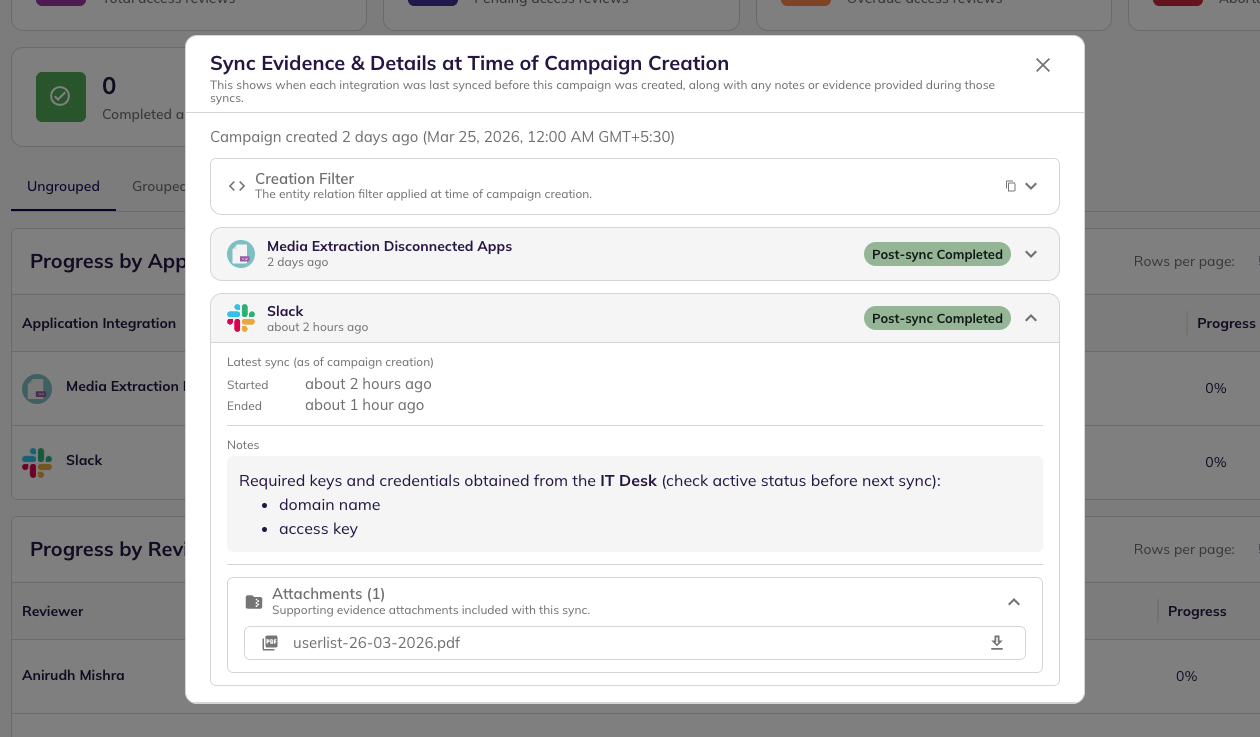
#### What the campaign dialog shows
The **Sync Evidence & Details at Campaign Creation** dialog is read-only.
It can include the following sections.
**Campaign Creation Filter**
If the campaign was created from filters, the dialog shows a collapsible JSON viewer with the captured filter criteria.
This can document:
* included integrations
* entity types
* roles
* other scoping logic used at campaign creation time
**Per-integration sync cards**
The dialog includes one card for each integration used in the campaign.
When you expand a card, you can see:
* integration name
* integration logo
* sync status **at campaign creation time**
* sync start and end timestamps
* sync status message
* audit evidence notes
* attached evidence files, with individual downloads
{% hint style="info" %}
This is a historical snapshot.
It does not change after campaign creation, even if the integration syncs again later. This is because it reflects the information attached to the latest sync for each integration **at time of campaign creation**.
{% endhint %}
### Common use cases
#### Validate source data during an audit
Use sync evidence to show the supporting records that explain why BalkanID imported a specific set of users, groups, roles, or entitlements. This can include media such as user/role lists from the source application, or excel sheets with counts which need to be validated against the data extracted by BalkanID.
#### Prove what the campaign was based on
Use the campaign snapshot to show the sync state that existed when the campaign was created. as well as any supporting context in the form of notes or attachments.
#### Preserve setup knowledge
Store notes about scopes, app-specific quirks, and prior approvals so future admins do not have to rediscover them.
---
# Agent Instructions
This documentation is published with GitBook. GitBook is the documentation platform designed so that both humans and AI agents can read, navigate, and reason over technical content effectively. Learn more at gitbook.com.
## Querying This Documentation
If you need additional information that is not directly available in this page, you can query the documentation dynamically by asking a question.
Perform an HTTP GET request on the current page URL with the `ask` query parameter, and the optional `goal` query parameter:
```
GET https://docs.balkan.id/getting-started/setting-up-your-tenant/application-integrations/audit-evidence-and-sync-history.md?ask=&goal=
```
`ask` is the immediate question: it should be specific, self-contained, and written in natural language.
`goal` is optional and describes the broader end goal you are ultimately trying to accomplish on behalf of the user. GitBook uses it to tailor the answer towards what is most useful for that goal.
The response will contain a direct answer to the question and relevant excerpts and sources from the documentation.
Use this mechanism when the answer is not explicitly present in the current page, you need clarification or additional context, or you want to retrieve related documentation sections.